
Turning Insights into Action Without the Dashboard
The most valuable social listening insight in the world is worthless if no one sees it in time to act. Your PR team can't respond to a brewing crisis if they only check the dashboard once a day. Your customer support team can't address complaints if they're buried in a weekly report. And your executives don't want to log into another platform - they want relevant information delivered to their inbox.
Mailing lists solve this problem by automatically delivering filtered, relevant mentions directly to the people who need them, at the frequency that makes sense for their role. This guide explains how to design an effective alerting strategy and configure mailing lists that keep your team informed without overwhelming them.
Designing Your Alerting Strategy
Before creating mailing lists, think strategically about who needs what information and when. Different stakeholders have different needs, and a one-size-fits-all approach typically fails - either overwhelming some people with too much information or leaving others without the alerts they need.
Consider your PR and communications team first. They typically need to know immediately when something significant happens - a negative mention from a verified account, a complaint that's gaining traction, or any conversation that could escalate into a crisis. For them, real-time alerts on high-priority mentions are essential. But they don't need every mention; they need the ones that require immediate attention.
Your customer support team has different needs. They want to catch customer complaints so they can reach out proactively, but they don't need the same urgency as PR. A daily digest of negative mentions gives them a manageable queue to work through each morning without creating alert fatigue.
Marketing teams often want broader awareness of how campaigns are performing and what conversations are happening around their brand. A weekly summary that includes sentiment trends and notable mentions provides the overview they need without daily interruptions.
Executives and leadership typically want the highest-level view - a monthly or weekly summary that captures overall sentiment trends, major themes, and any significant events. They're not going to respond to individual mentions, but they need awareness of the broader conversation landscape.
Creating a Mailing List
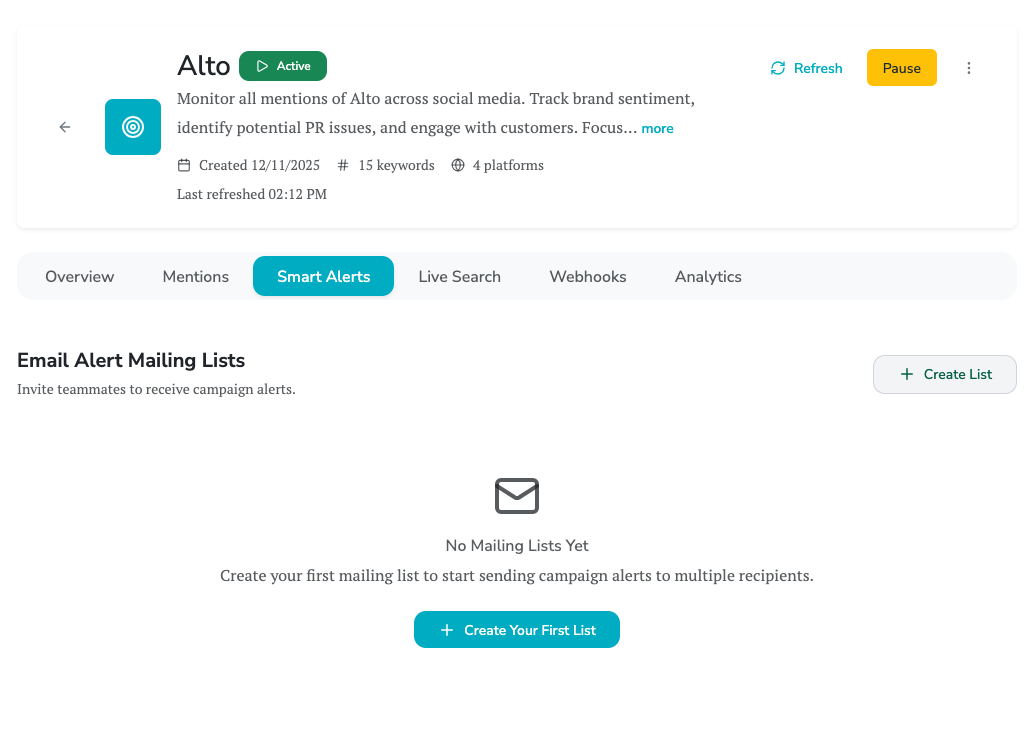
To create a mailing list, open your campaign and navigate to the Smart Alerts tab. Click "Create Mailing List" to begin configuration.
Start with a descriptive name that clearly indicates the list's purpose. "Daily PR Alerts" is better than "Alert List 1." Good names help you manage multiple lists and help recipients understand why they're receiving these emails.
The description field provides context for list administrators and can be referenced when reviewing your alerting configuration. Use it to document the reasoning behind this list's filters and frequency choices.
Configuring Content Filters
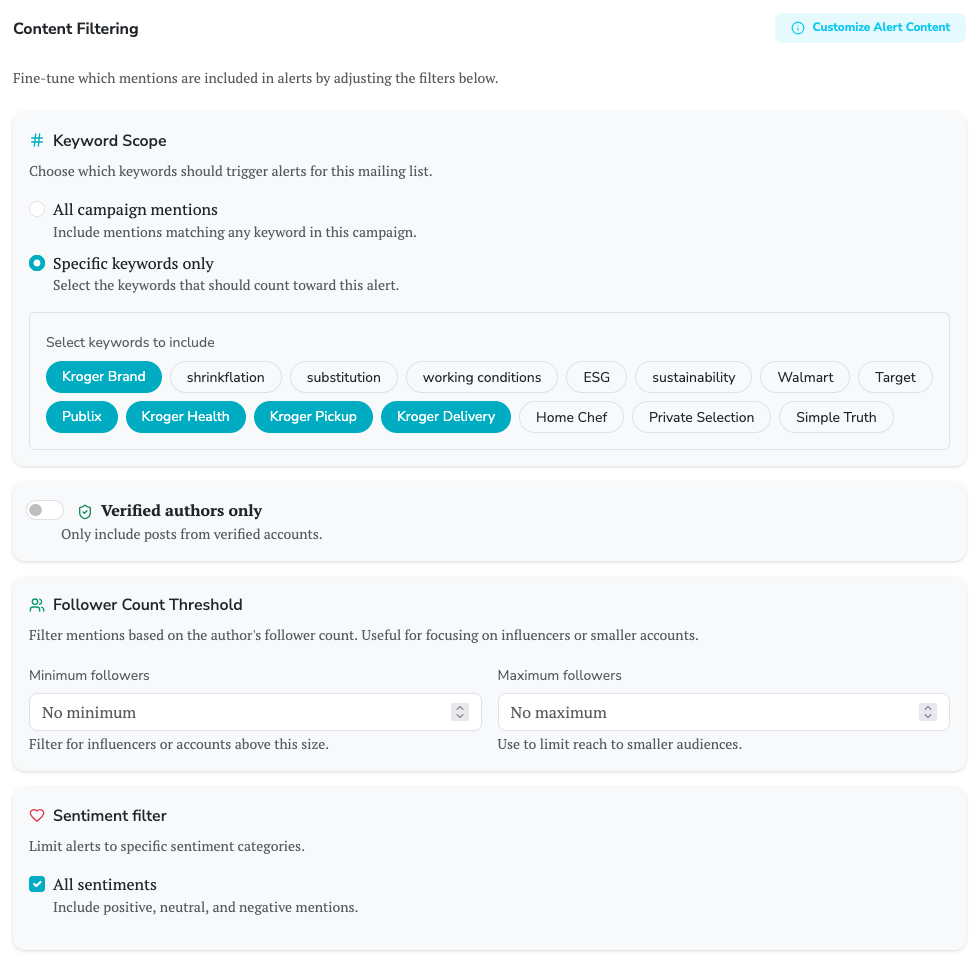
Content filters are the heart of an effective mailing list. They determine which mentions trigger alerts and which get filtered out. Getting filters right is the difference between useful alerts and noise that gets ignored.
Keyword scope lets you narrow alerts to specific keywords within your campaign. If your campaign monitors both your brand and competitors, you might create one mailing list that only alerts on your brand keywords and another that focuses on competitor mentions. This separation allows different teams to receive only the information relevant to their work.
Sentiment filters are perhaps the most powerful tool for relevance. A mailing list that only triggers on negative mentions delivers actionable alerts - every email represents something that might need a response. Compare this to an unfiltered list that includes every positive and neutral mention, burying the important signals in a flood of routine content.
You can combine sentiments when needed. A list that alerts on both negative and neutral mentions might make sense for a support team that wants to catch questions (often neutral) in addition to complaints (negative). But be thoughtful about combinations - adding more sentiments increases volume, and volume is the enemy of engagement.
Author filters add another layer of precision. The "verified authors only" option limits alerts to mentions from accounts that platforms have verified - typically media outlets, public figures, and established brands. A negative mention from a verified account with significant reach is more likely to require immediate attention than one from a personal account with 50 followers.
Minimum follower count thresholds work similarly. Setting a 10,000-follower minimum ensures alerts only trigger for mentions from accounts with meaningful reach. This is particularly useful for PR teams focused on potential amplification - a complaint from someone with 100,000 followers deserves faster attention than one from someone with 100.
These filters combine to create precise targeting. A mailing list configured for "negative sentiment + verified authors + 50,000+ followers" delivers only high-priority alerts that almost certainly require attention. The specificity means you can confidently set this to real-time delivery without overwhelming recipients.
Choosing Alert Frequency
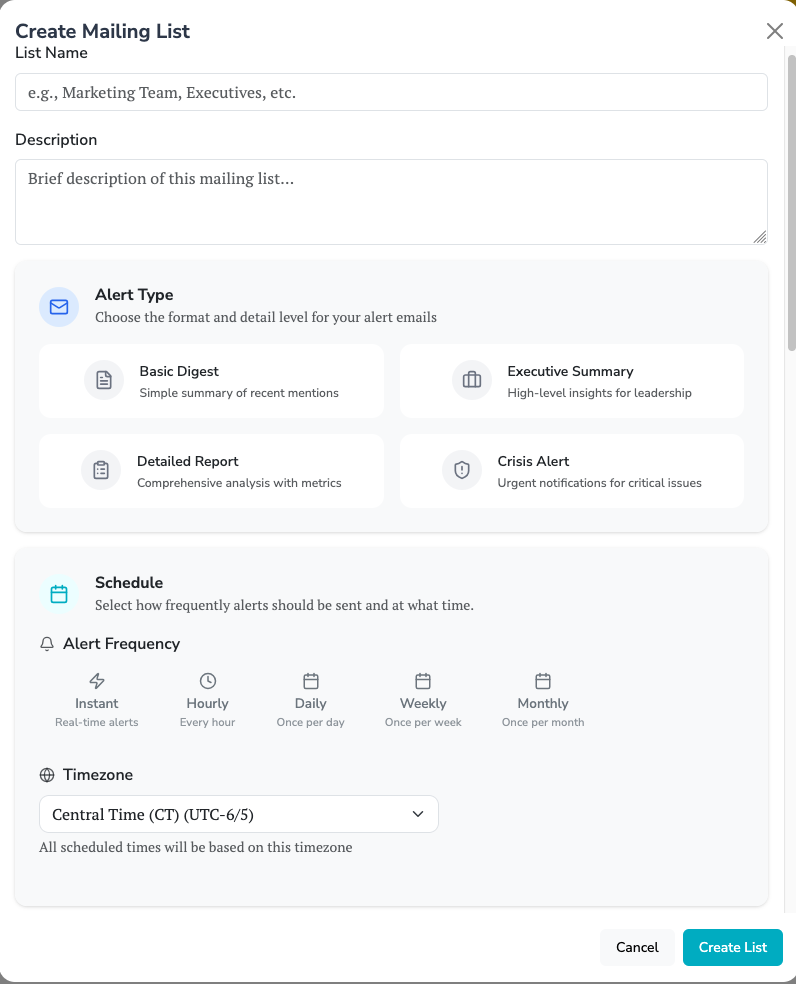
Frequency determines how often alerts are sent and significantly impacts whether recipients actually engage with them.
Real-time alerts send immediately when a matching mention is detected. Use this sparingly and only for truly urgent situations - crisis keywords, high-reach negative mentions, or specific topics that require immediate response. Real-time alerts for broad criteria create alert fatigue that causes recipients to start ignoring emails.
Daily digests compile all matching mentions from the past 24 hours into a single email sent at a consistent time, typically in the morning. This is the sweet spot for most operational use cases. Support teams get a manageable queue. Marketing gets awareness without interruption. The daily rhythm creates a habit without overwhelming.
Weekly digests summarize a full week of mentions. This works well for stakeholders who need awareness but not operational involvement - executives, board members, or team members in adjacent functions. Weekly emails are more likely to actually get read than daily ones for people who aren't taking action on individual mentions.
Monthly digests provide the longest-term view. Use these for quarterly business reviews, board updates, or stakeholders who only need occasional awareness. Monthly summaries should be designed for trend analysis rather than individual mention review.
Adding and Managing Recipients
After configuring your mailing list, add recipients through the Manage interface. Enter email addresses and assign roles - Members receive alerts, while Admins can also modify the list configuration.
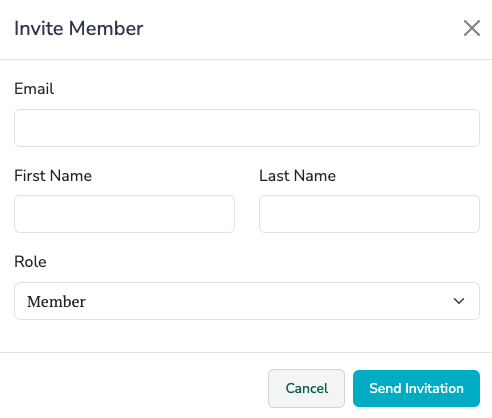
Recipients receive a confirmation email and have the option to unsubscribe at any time. This is important for compliance and ensures your alerts only go to people who actually want them. If someone unsubscribes, you'll see their status change in the recipient list.
Monitor recipient engagement through the list analytics. If open rates are low, your alerts might be too frequent or not relevant enough. If bounce rates are high, clean up your recipient list to remove invalid addresses. Engagement data helps you refine your alerting strategy over time.
Real-World Configuration Examples
Consider a mid-sized consumer brand setting up their alerting strategy. They might create four mailing lists:
The first list targets the PR team: negative sentiment only, verified authors only, with a 25,000+ follower threshold, sent in real-time. This list generates perhaps 5-10 alerts per week, each representing a potentially significant situation that warrants immediate review.
The second list serves customer support: negative sentiment only, all authors, sent as a daily digest. This creates a morning queue of 10-30 mentions that support can systematically review and address, turning social complaints into proactive outreach opportunities.
The third list goes to marketing: all sentiments, all authors, sent as a weekly digest. This gives marketing team members broad awareness of the conversation landscape without creating daily interruptions. They can spot trends, find user-generated content, and understand how campaigns are being received.
The fourth list reaches the executive team: all sentiments with a summary focus, sent monthly. Leadership gets a high-level view suitable for board updates and strategic planning without needing to engage with day-to-day operations.
This configuration ensures everyone gets the information they need in a format that matches how they'll use it. The PR team can respond immediately to potential crises. Support can proactively address complaints. Marketing stays aware without drowning. And executives get strategic visibility without operational noise.
Monitoring and Optimizing Performance
Mailing lists include analytics that help you understand whether your alerts are effective. Delivery rate shows how many emails successfully reached recipients - a low rate might indicate email configuration issues or invalid addresses. Open rate reveals whether recipients are actually reading the alerts - low open rates suggest the frequency is too high or the content isn't relevant enough.
Use these metrics to continuously refine your strategy. If a daily digest has low open rates, consider whether it should become weekly. If real-time alerts aren't being opened promptly, reconsider whether they're truly urgent enough for real-time delivery. The goal is alerts that recipients value and act upon, not volume for its own sake.
Effective alerting transforms social listening from a passive monitoring tool into an active operational capability. When the right mentions reach the right people at the right time, your organization can respond to opportunities and threats in real time. The investment in thoughtful mailing list configuration pays dividends in faster response times, better customer experiences, and more proactive reputation management.