
Welcome to Socialhose
Social listening has become an essential practice for businesses of all sizes. Every day, thousands of conversations happen across social media platforms where people discuss brands, products, services, and industries. These conversations contain invaluable insights - customer feedback you never asked for, complaints you might not hear through traditional support channels, praise that could become testimonials, and competitive intelligence that shapes your strategy. Socialhose helps you capture all of this by continuously monitoring social media for the topics that matter to your business.
This guide will walk you through everything you need to know to get started, from creating your first campaign to understanding how data flows through the system. By the end, you'll have a fully functioning social listening setup that delivers insights directly to your inbox.
Understanding the Core Concepts
Before diving into the setup process, it helps to understand how Socialhose works at a fundamental level. The platform is built around three core concepts: campaigns, mentions, and alerts.
A campaign is your monitoring container. Think of it as a project that defines what you're tracking. Each campaign has its own set of keywords, platform selections, and alert configurations. You might have one campaign for your main brand, another for a specific product line, and a third for competitive monitoring. Keeping these separate helps you organize your data and set up different alert rules for different audiences.
A mention is any piece of social content that matches your campaign's keywords. When someone tweets about your brand, posts on Reddit about your product, or shares their experience on Instagram, that content becomes a mention in your system. Each mention includes the full text, author information, engagement metrics, sentiment analysis, and a direct link back to the original post.
Alerts are how Socialhose keeps you informed without requiring constant dashboard monitoring. Through mailing lists, you can configure email digests that summarize relevant mentions and deliver them to the right people at the right frequency. Your PR team might get real-time alerts about negative mentions from verified accounts, while your executive team receives a weekly summary of overall sentiment trends.
Creating Your First Campaign
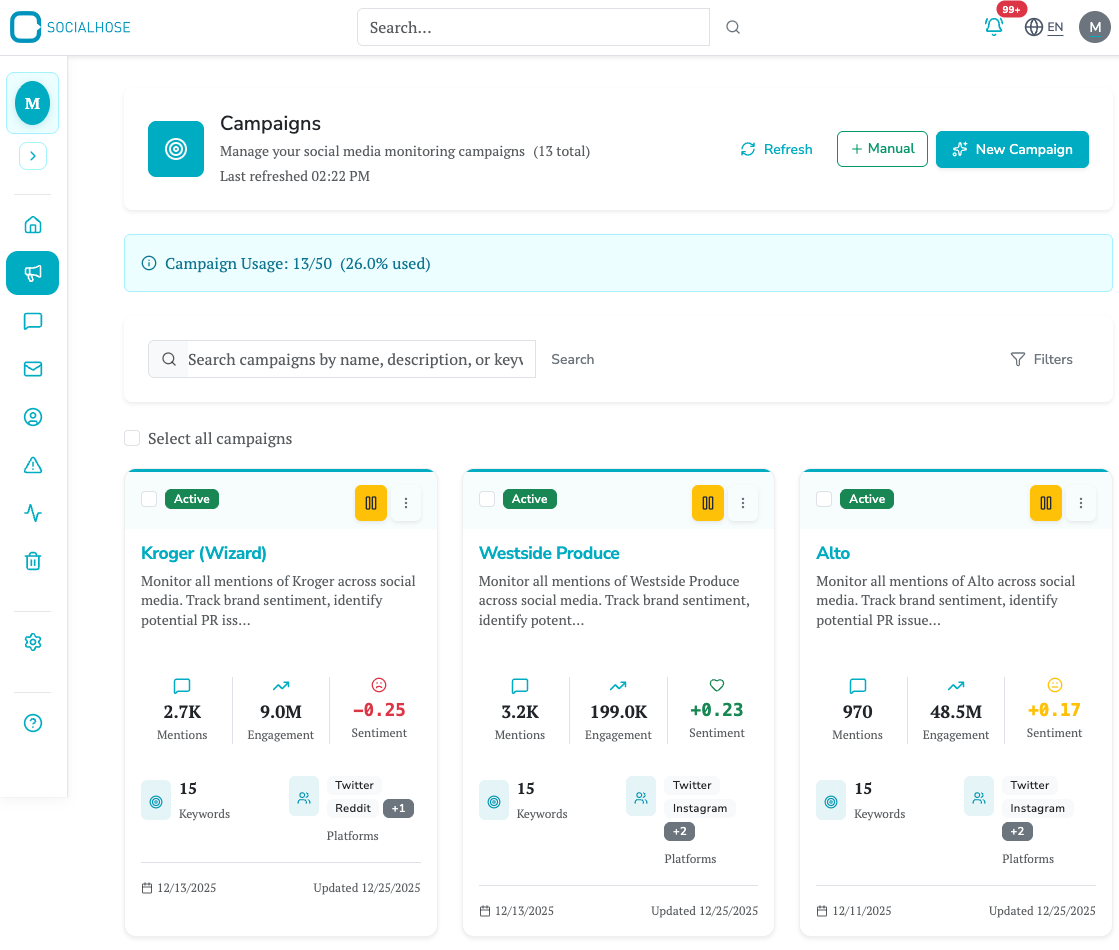
To create a campaign, navigate to the Campaigns section using the sidebar navigation. You'll see a "Create Campaign" button that offers two paths: the Campaign Wizard and Quick Create. For your first campaign, the Wizard is the better choice because it guides you through each decision with helpful context and recommendations.
Step 1: Define Your Objectives
The first screen asks you to describe your monitoring goals in natural language. This isn't just for documentation - Socialhose uses your description to suggest relevant platforms and initial keywords. Be specific about what you want to achieve. Instead of writing "monitor our brand," try something like "Track mentions of Acme Corp and our flagship product, the Widget Pro, to identify customer feedback and potential PR issues before they escalate."
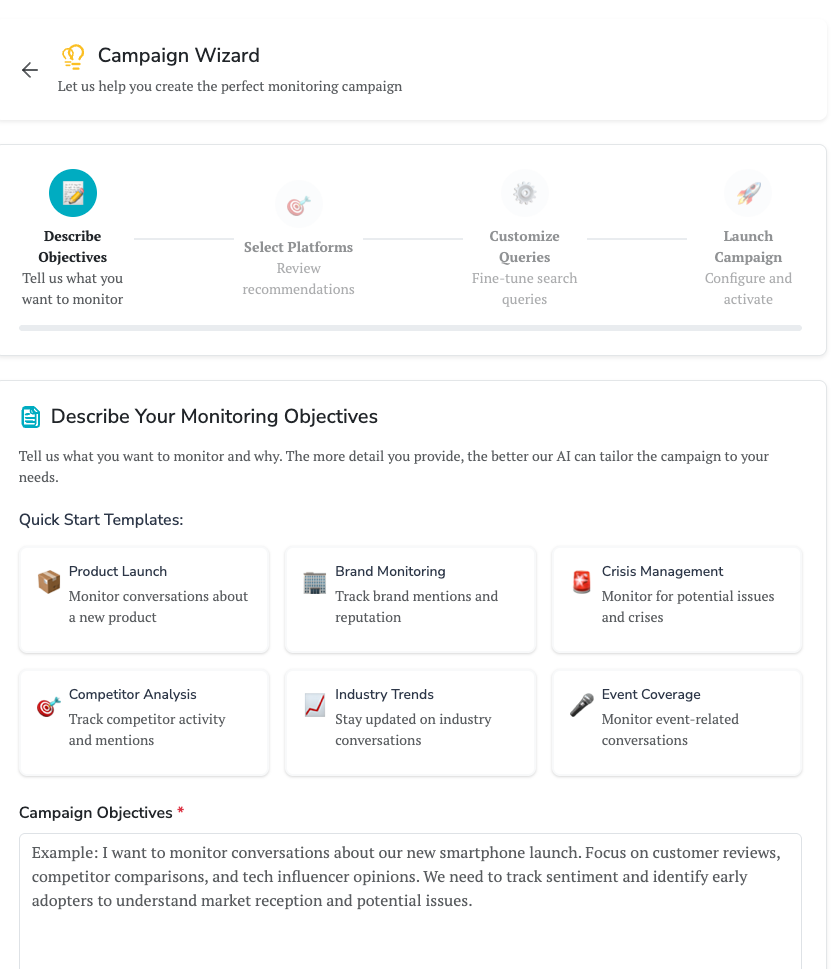
Good objectives often include the brand or product names you're tracking, the type of insights you're looking for (customer feedback, competitive intelligence, campaign measurement), and any specific concerns like crisis detection or influencer identification.
Step 2: Select Your Platforms
Based on your objectives, Socialhose recommends which platforms to monitor. Each platform has its own characteristics. Twitter/X is excellent for real-time conversations and breaking news - people often turn there first when they have something to say about a brand. Instagram captures visual mentions and lifestyle content, particularly valuable for consumer brands. Reddit provides deep, authentic discussions in niche communities where people speak candidly about products and services. LinkedIn is essential for B2B companies monitoring professional conversations. Facebook captures community group discussions and page comments.
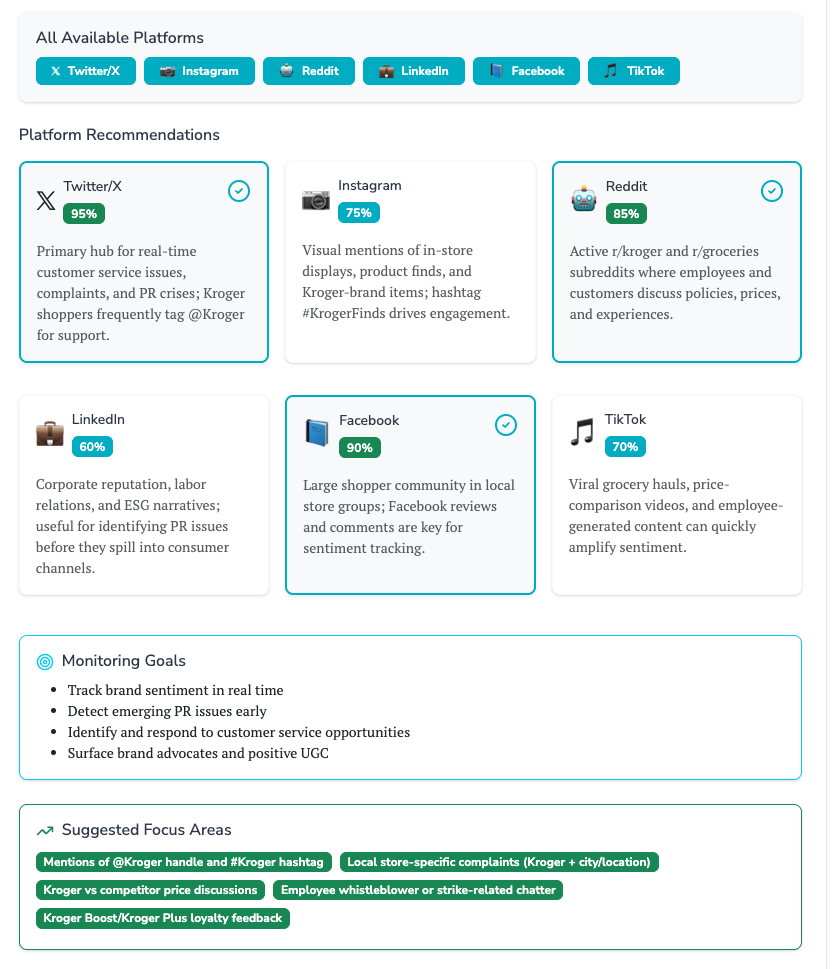
You don't need to select every platform. In fact, starting with two or three platforms that are most relevant to your audience often produces better results than trying to monitor everything. You can always add more platforms later as you refine your approach.
Step 3: Configure Your Keywords
Keywords determine what content gets captured. This is the most important configuration step because it directly affects the quality and relevance of your results. Start with obvious terms like your brand name, but think beyond the basics. Include common misspellings (people often mistype brand names), product nicknames that customers use, relevant hashtags, and key executive names if you're monitoring thought leadership.
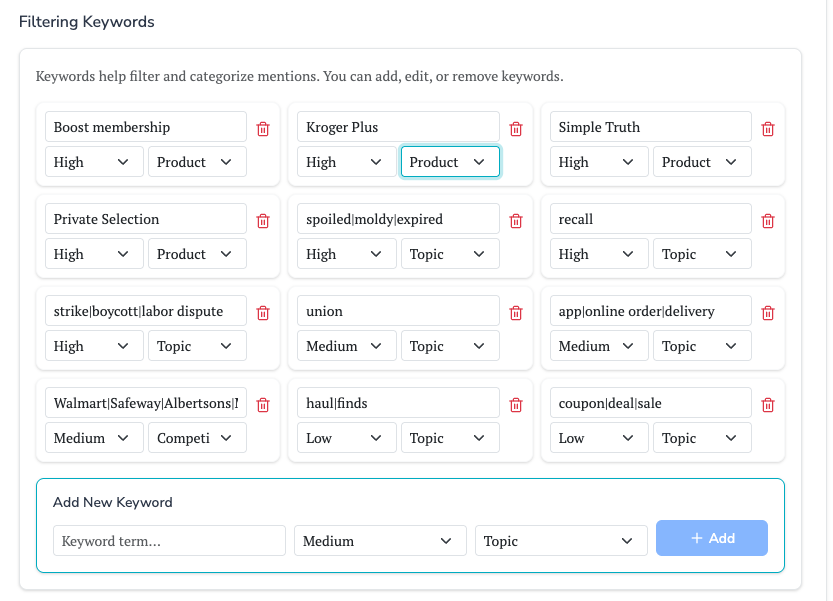
Keywords use simple text matching, so enter them exactly as you want them found. The boolean logic happens at the Live Search level, where queries are automatically formatted using each platform's native search syntax. This means you can tailor your searches per platform, since different terms often perform better on different channels.
Step 4: Launch Your Campaign
Give your campaign a descriptive name that will make sense when you're managing multiple campaigns. Choose whether to activate immediately or save as a draft. Activating immediately starts data collection right away - within minutes, you'll see your first mentions appearing as live searches begin querying the selected platforms.
How Data Collection Works
Understanding how data flows through Socialhose helps you make sense of what you see and troubleshoot any issues. When you activate a campaign, the system creates what we call "live searches" for each platform you selected.
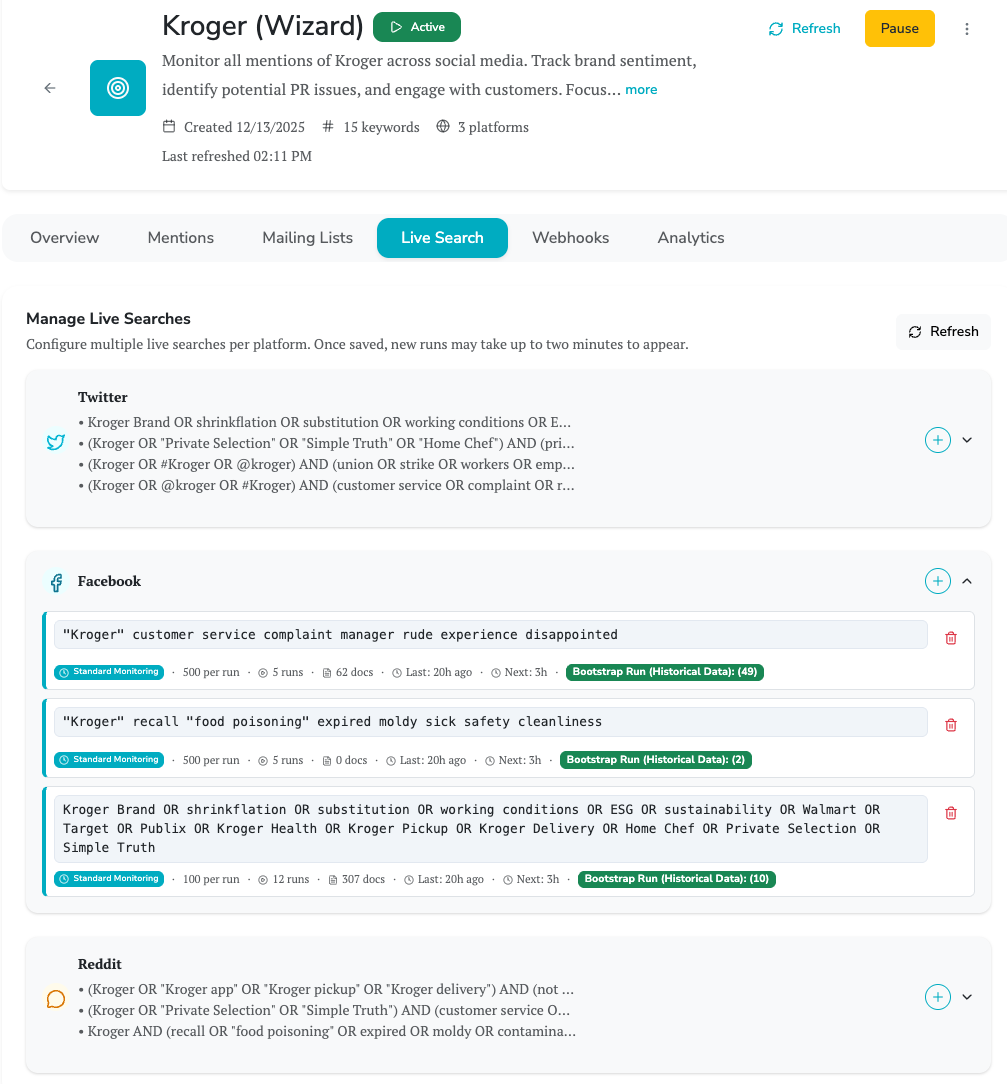
Two types of Live Searches work together. First, a bootstrap search runs once to collect historical data - up to 30 days of past mentions matching your keywords. This gives you immediate context about existing conversations rather than starting from a blank slate. Bootstrap searches typically complete within 15-30 minutes depending on how much historical content exists for your keywords.
Second, Live Searches run on a schedule (daily by default) to capture new mentions going forward. These searches continue running as long as your campaign is active, ensuring you never miss relevant conversations. You can monitor Live Search status in your campaign's "Manage Live Searches" tab, where you'll see last run times, next scheduled runs, and document counts.
Each piece of content collected goes through AI enrichment, which analyzes the text to determine sentiment (positive, neutral, or negative), extract named entities (people, companies, products, locations), detect intent (is this a question, complaint, praise, or general mention?), and identify key phrases. This enrichment happens automatically and makes your data immediately actionable.
Exploring Your Mentions
The Mentions page is where you'll spend most of your time. It displays all collected content with powerful filtering and search capabilities. By default, you see the most recent mentions across all your campaigns, but you can narrow this down using the filter bar.
Date range filters let you focus on specific time periods - today, yesterday, last 7 days, last 30 days, or a custom range. Campaign filters isolate mentions from a specific monitoring project. Platform filters help you understand where conversations are happening. Sentiment filters are particularly useful when you want to address negative feedback or celebrate positive mentions.
Each mention card shows the content, author information, platform source, sentiment classification, and engagement metrics. Click any mention to see the full details and access the direct link to the original post. You can also take actions like changing the status (new, reviewed, responded, escalated, dismissed) or manually adjusting the sentiment if the AI classification wasn't quite right.
Setting Up Your First Alert
Constantly checking a dashboard isn't sustainable. Mailing lists let you automate the delivery of relevant mentions to the right people. Navigate to your campaign and click on the Mailing Lists tab. Create a new list by giving it a name that describes its purpose, like "Daily PR Summary" or "Urgent Negative Alerts."
Content filters determine which mentions trigger alerts. You can filter by sentiment to only alert on negative mentions, by author verification status to focus on influential accounts, or by minimum follower count to prioritize high-reach mentions. These filters help ensure recipients only get alerts they actually need to act on.
After configuring filters, add recipients by email and select the alert frequency. Real-time alerts send immediately when matching mentions arrive - useful for crisis keywords. Daily digests compile a summary once per day. Weekly and monthly options work well for executives who want high-level awareness without daily interruptions.
What to Do Next
With your first campaign running and alerts configured, you're ready to explore the platform's advanced capabilities. The Analytics dashboard provides visualizations of your mention data - sentiment trends over time, platform distribution, engagement patterns, and more. You can create custom dashboards focused on the metrics that matter most to your role.
Saved Searches let you store commonly-used filter combinations for quick access. If you frequently check for negative mentions from verified accounts in the last 24 hours, save that search and access it with a single click.
Webhooks enable real-time integration with your own systems. Instead of (or in addition to) email alerts, you can have Socialhose push mention data to your own applications - feeding a custom dashboard, triggering Slack notifications, creating tickets in your support system, or storing data in your data warehouse.
Finally, don't forget to invite your team. Organization management lets you add colleagues with appropriate role-based permissions, ensuring everyone who needs access has it while maintaining security for sensitive data and billing information.
Social listening is a practice that improves over time. As you review mentions, you'll identify patterns - keywords that capture noise you want to filter out, platforms that generate particularly valuable insights, alert frequencies that match your team's workflow. Use these learnings to refine your campaigns. The most successful social listening programs evolve continuously based on what the data reveals.